
BestPlay
Expert and User Insights by BestPlay Customers
BestPlay is a light gaming-reward platform that pays small amounts for daily playtime, achievements, and missions. Designed for casual players, it provides micro-payouts with frequent bonuses. It’s ideal for users seeking fun, low-effort ways to earn minor rewards.

See user reviews
Honest Review with no Affiliate ties to the featured platform.
Key Findings
| Overall Verdict | Light gaming micro-payouts |
| Best For | Global casual players |
| Realistic Earnings | $20 |
| Main Drawbacks | ≤$1/hr rates |
Expert Review

Folasade Oluwagbenga
Money Making Expert
BestPlay keeps things genuinely simple. Pick a game, play it, collect coins every four hours, and cash out to PayPal or gift cards. It also lets you donate earnings to charitable causes, which is a rare and welcome touch in this space. Ad frequency is the biggest complaint across user reviews, and earning rates have dropped over time. Expect around $1 per hour at best, but payouts do come through quickly.
BestPlay Review: My Honest Experience Playing Games For Cash
A first-person review of how BestPlay works, how much I earned, and what to know before cashing out.
Quick Verdict
I used BestPlay as a casual gaming rewards app, and my honest take is simple: it pays, but the earning rate is low and the app is full of ads. The best part is that the app is easy to understand. Pick a game, play, collect coins, wait for the balance update, and cash out when your money balance reaches the minimum.
My realistic result was about $20 after roughly 20 hours of total play over a month. That works out close to $1 per hour. If I used it for two focused hours in a day, I would expect at least around $2 per day as long as I picked better-paying games, kept my streak active, and converted coins during the 4 hour earning cycle.
The minimum PayPal cashout I would plan around now is $5. Gift card and donation options can vary by region, but PayPal and popular gift cards are the main payout options people usually care about.
What BestPlay Is
BestPlay is a mobile rewards app where you earn coins for playing casual games. The games are mostly puzzle, card, sorting, word, matching, and classic-style games. It feels similar to other play-to-earn apps, but BestPlay has its own game catalog, streak bonuses, coin goals, and a cashout cycle.
The app is strongest if you already enjoy simple mobile games. I would not use it if I hated ads or wanted every minute tracked perfectly in dollars. It uses coins first, then those coins convert into a money balance, which makes the earning rate less obvious until you test it for a few sessions.
I treated Android as the main version to test because the clearest app listing and screenshots are Android-focused. If you are on iPhone, I would check your App Store first because availability can change by country and device.
My Signup And First Look
The dashboard was easy to understand after a few minutes. At the top, I saw game coins, a money balance, and a countdown showing when the next balance update would happen. Under that, the app showed trending games and more games to install.
The countdown matters. BestPlay does not feel like a normal offerwall where every task instantly adds cash. You collect coins by playing, and then the app updates the cash balance on a cycle. That waiting cycle is one of the biggest things to understand before judging your earnings.
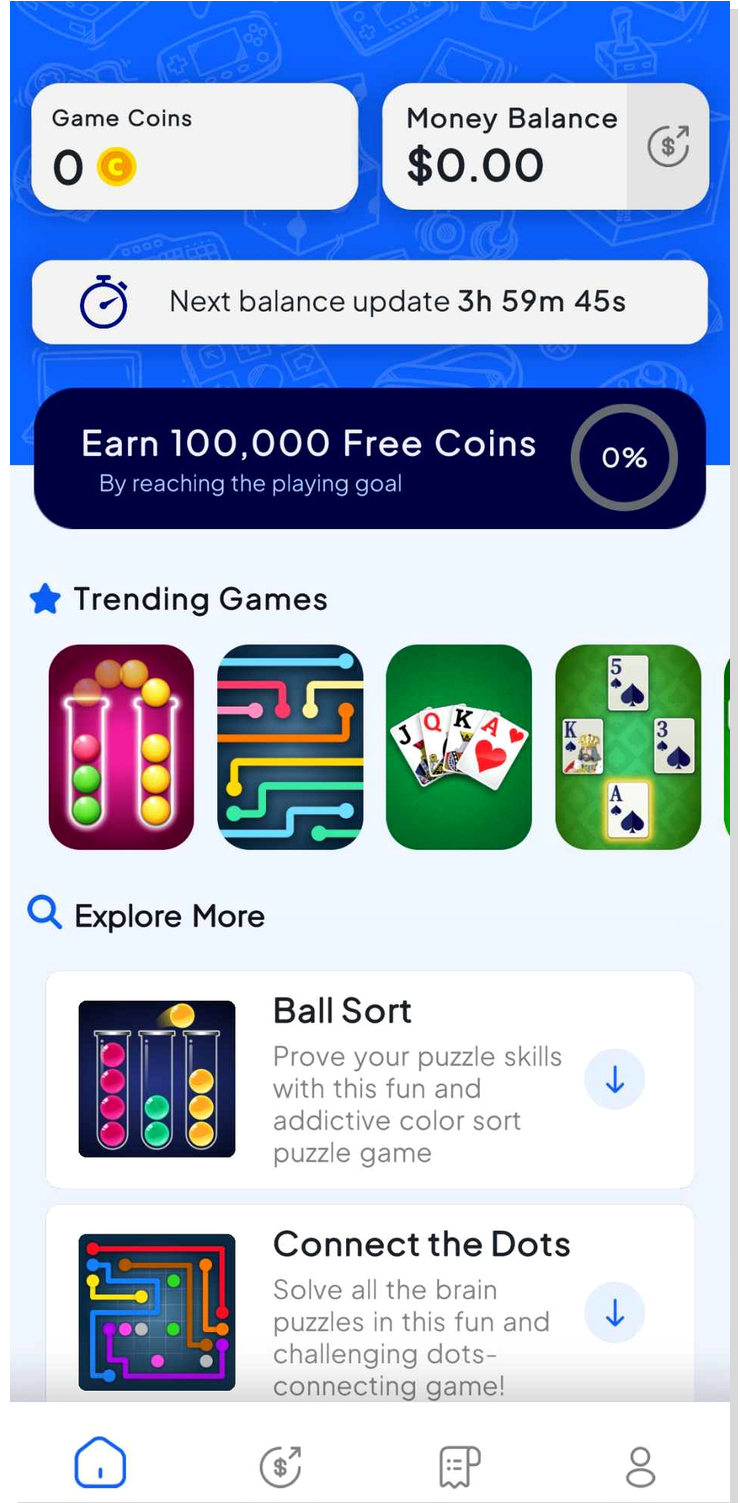
This was the main dashboard I checked: coins, money balance, countdown, games, and the bottom cashout/history tabs.
How I Earned Coins
The main way I earned was by installing and playing the games inside the BestPlay app. The app pushes certain games harder than others, and the better picks usually show stronger earning labels or promo-style boosts.
I had better results when I focused on one or two games instead of installing everything. The weak approach was jumping between games too quickly, watching a pile of ads, and then realizing the coins were not moving fast enough to justify the time.
The games themselves were not hard. The friction came from ads, unclear coin value, and waiting for the conversion window. Some games looked fun enough to play anyway, but if a game felt slow after the first session, I moved on.
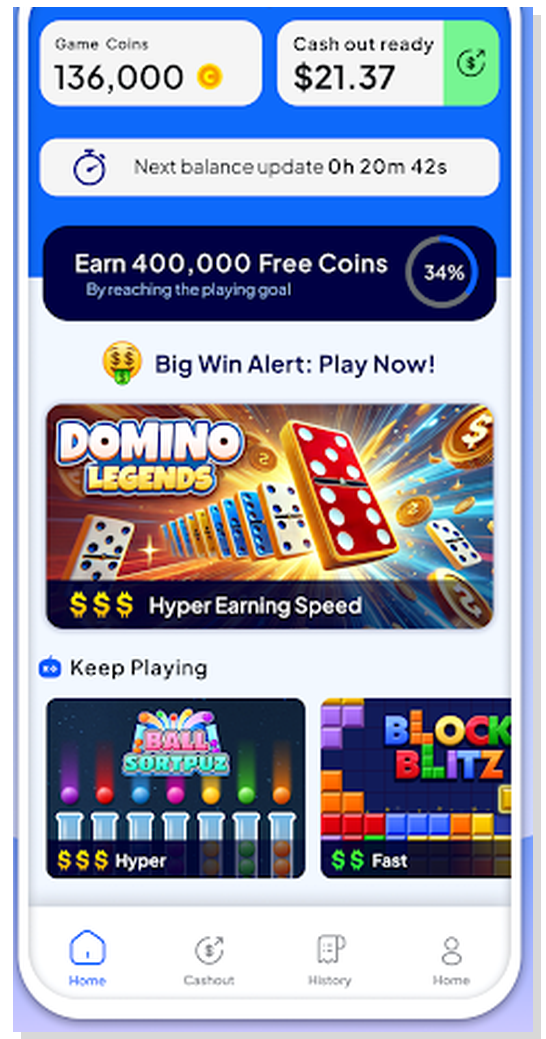
The dashboard makes it tempting to try every game, but I got better results by sticking with the games that moved coins faster.
How Much I Earned
I personally made about $20 in roughly 20 hours of total use. That is the number I would use for realistic expectations because it matches how the app actually feels after ads, slow games, and waiting for balance updates.
On a normal day, I would expect around $1 per hour at best. If I played two focused hours, I would expect at least around $2. If a double coin promotion lined up with a game that tracked well, I could see a better day around $3 to $5, but I would not count on that every day.
The app shows large coin numbers, which can make it feel like you are earning faster than you are. For me, the useful way to think about it was not coins. I only cared about how much real money reached the balance after the conversion cycle.
Minimum Withdrawal And Payout Options
This is the section I would check before spending serious time in the app because payout rules can change. I would plan around a $5 PayPal minimum. Some older cashouts and test accounts may show smaller amounts, but $5 is the safer number to expect now.
BestPlay also shows gift cards and donation options. Gift cards can include brands like Amazon, Google Play, iTunes, Walmart, and Target depending on region and account. I would check the Cashout tab in my own account before grinding because rewards and minimums can move around.
| Payout detail | What I would expect |
|---|---|
| Minimum PayPal withdrawal | I would plan around $5 now. Older smaller cashouts may appear in some accounts, but $5 is the safer expectation. |
| Gift cards | Amazon, Google Play, iTunes, Walmart, Target, and similar rewards can appear depending on country and account. |
| Donation option | BestPlay also lets users donate rewards to supported causes. |
| Coin conversion cycle | Coins can convert to the money balance about every 4 hours, so checking too early is a waste of time. |
| Payout timing | When everything works, payouts can be fast and may arrive the same day or within 1 day. |
| Verification risk | Identity or face verification may appear at cashout. Cash out small first and keep screenshots. |
Payout Speed And Verification
When the app works smoothly, payouts can be fast and may arrive the same day or within 1 day. The transaction history screen is useful because it shows confirmed payouts clearly.
The part I did not love is verification. Cash apps and reward apps can ask for identity or face verification, and BestPlay has had user complaints around cashout errors, account blocks, and slow support. That is why I would cash out at the minimum first instead of letting a large balance sit there.
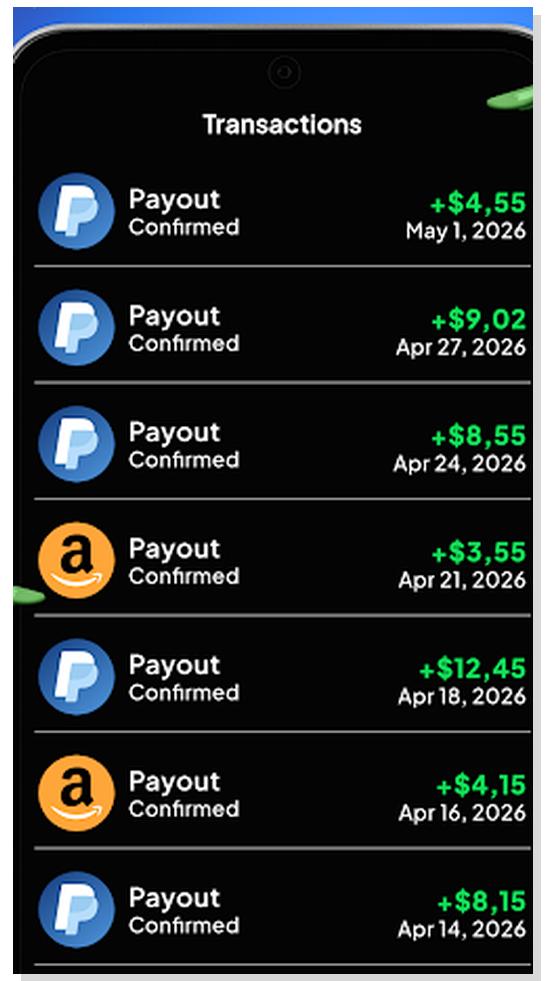
The history screen is useful because it separates confirmed payouts from coins that are still waiting to convert.
What I Liked
- I liked that the app is simple and does not bury the main earning path.
- I liked the variety of casual games, especially puzzles and card games.
- I liked that PayPal, gift cards, and donations are part of the reward setup.
- I liked the 4 hour conversion cycle because it gave me clear times to check back.
- I liked that small payouts are possible when the app is working properly.
What Was A Waste Of Time
- Playing slow coin games for too long was a waste of time.
- Ignoring the 4 hour conversion timer was a waste of time because I kept checking too early.
- Watching long ad loops without checking my real balance was a waste of time.
- Chasing the biggest promo-looking game without testing tracking first was a mistake.
- Waiting on support for small problems can be frustrating, so I would not let a large balance build up.
Tips That Helped Me Earn More
- Convert coins to the money balance every 4 hours when the app allows it.
- Focus on games that move coins quickly instead of playing everything.
- Keep the daily streak active because weekly bonuses can help.
- Watch for double coin promotions before starting a longer session.
- Cash out as soon as you hit the minimum so you can test the payout method.
- Take screenshots of your balance and cashout attempts if something goes wrong.
- Use the app when you already want to play games, not when you need fast money.
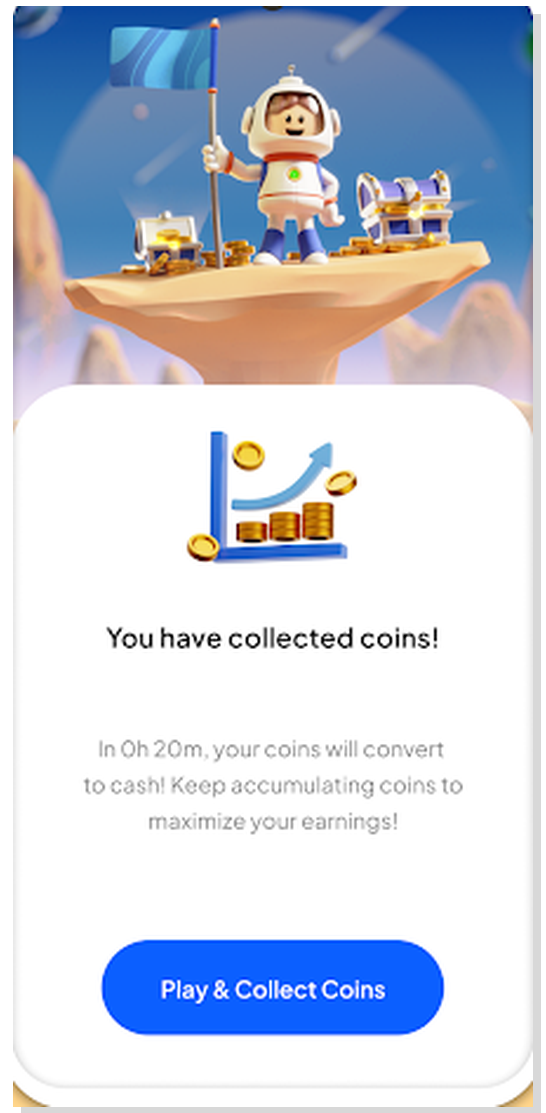
The coin collection screen shows why timing matters. Coins do not feel useful until they convert into the cash balance.
Customer Support And App Reputation
The public feedback around BestPlay is split. I saw a lot of positive payment feedback, but I also saw enough complaints about account blocks, cashout errors, ads, and slow support to be careful.
That matches my own approach to the app. I would not panic over every complaint, but I also would not build up a large unpaid balance. I would test the payout flow early, keep screenshots, and use it casually.
Final Verdict
BestPlay is worth trying if you already like casual mobile games and want to earn a small amount while playing. It is not worth using if you hate ads, want clear dollar tracking from the first minute, or get annoyed by waiting cycles.
My realistic result was about $20 after roughly 20 hours, close to $1 per hour. If I used it for two focused hours per day, I would expect at least around $2 per day, and maybe more on better promo days. The best strategy is simple: pick faster games, use the 4 hour conversion cycle, cash out at $5, and do not let a big balance sit unpaid.
The app is easy to like when payouts work. The main things to watch are low hourly earnings, lots of ads, confusing coin values, verification, and possible cashout or support problems.
User Reviews | BestPlay
Current average review
Based on 2 user reviews

Ella Ricci
I used this app for three days, on and off, and it really surprised me. At first, I was skeptical because most apps promise things like “cash out in 4 hours” or “earn money fast,” but rarely deliver. I decided to test it by spending about five minutes playing. After four hours, I was able to withdraw the amount to my PayPal account, and within three minutes, it showed up. It was only a few cents, but it actually worked. I repeated the process twice more just to be sure it wasn’t a scam. So far, I’ve cashed out $5, and I genuinely like it. There are only ten games, but they’re enjoyable. The earning rates rotate—some games pay faster than others—but unfortunately, the ones I like most earn coins more slowly. Right now, they’re offering double coins, and I’ve earned around one million coins, which equals about $0.75. It’s not much, but I only played a few minutes. Once you reach 400,000 coins, you can redeem that amount in each payout session.
Julia Smirnov
It now takes a minimum of $5 to cash out to PayPal with BestPlay. The change happened last night, right when I was about to make my second withdrawal. It didn’t take too long to reach the new $5 mark, but the sudden update was frustrating, especially since there was no prior notice.
Is BestPlay Legit?

Expert and User Insights by BestPlay Customers
BestPlay is a light gaming-reward platform that pays small amounts for daily playtime, achievements, and missions. Designed for casual players, it provides micro-payouts with frequent bonuses. It’s ideal for users seeking fun, low-effort ways to earn minor rewards.
See user reviews
Honest Review with no Affiliate ties to the featured platform.
Key Findings
| Overall Verdict | Light gaming micro-payouts |
| Best For | Global casual players |
| Realistic Earnings | $20 |
| Main Drawbacks | ≤$1/hr rates |
Expert Review

Folasade Oluwagbenga
Money Making Expert
BestPlay keeps things genuinely simple. Pick a game, play it, collect coins every four hours, and cash out to PayPal or gift cards. It also lets you donate earnings to charitable causes, which is a rare and welcome touch in this space. Ad frequency is the biggest complaint across user reviews, and earning rates have dropped over time. Expect around $1 per hour at best, but payouts do come through quickly.
BestPlay Review: My Honest Experience Playing Games For Cash
A first-person review of how BestPlay works, how much I earned, and what to know before cashing out.
Quick Verdict
I used BestPlay as a casual gaming rewards app, and my honest take is simple: it pays, but the earning rate is low and the app is full of ads. The best part is that the app is easy to understand. Pick a game, play, collect coins, wait for the balance update, and cash out when your money balance reaches the minimum.
My realistic result was about $20 after roughly 20 hours of total play over a month. That works out close to $1 per hour. If I used it for two focused hours in a day, I would expect at least around $2 per day as long as I picked better-paying games, kept my streak active, and converted coins during the 4 hour earning cycle.
The minimum PayPal cashout I would plan around now is $5. Gift card and donation options can vary by region, but PayPal and popular gift cards are the main payout options people usually care about.
What BestPlay Is
BestPlay is a mobile rewards app where you earn coins for playing casual games. The games are mostly puzzle, card, sorting, word, matching, and classic-style games. It feels similar to other play-to-earn apps, but BestPlay has its own game catalog, streak bonuses, coin goals, and a cashout cycle.
The app is strongest if you already enjoy simple mobile games. I would not use it if I hated ads or wanted every minute tracked perfectly in dollars. It uses coins first, then those coins convert into a money balance, which makes the earning rate less obvious until you test it for a few sessions.
I treated Android as the main version to test because the clearest app listing and screenshots are Android-focused. If you are on iPhone, I would check your App Store first because availability can change by country and device.
My Signup And First Look
The dashboard was easy to understand after a few minutes. At the top, I saw game coins, a money balance, and a countdown showing when the next balance update would happen. Under that, the app showed trending games and more games to install.
The countdown matters. BestPlay does not feel like a normal offerwall where every task instantly adds cash. You collect coins by playing, and then the app updates the cash balance on a cycle. That waiting cycle is one of the biggest things to understand before judging your earnings.

This was the main dashboard I checked: coins, money balance, countdown, games, and the bottom cashout/history tabs.
How I Earned Coins
The main way I earned was by installing and playing the games inside the BestPlay app. The app pushes certain games harder than others, and the better picks usually show stronger earning labels or promo-style boosts.
I had better results when I focused on one or two games instead of installing everything. The weak approach was jumping between games too quickly, watching a pile of ads, and then realizing the coins were not moving fast enough to justify the time.
The games themselves were not hard. The friction came from ads, unclear coin value, and waiting for the conversion window. Some games looked fun enough to play anyway, but if a game felt slow after the first session, I moved on.

The dashboard makes it tempting to try every game, but I got better results by sticking with the games that moved coins faster.
How Much I Earned
I personally made about $20 in roughly 20 hours of total use. That is the number I would use for realistic expectations because it matches how the app actually feels after ads, slow games, and waiting for balance updates.
On a normal day, I would expect around $1 per hour at best. If I played two focused hours, I would expect at least around $2. If a double coin promotion lined up with a game that tracked well, I could see a better day around $3 to $5, but I would not count on that every day.
The app shows large coin numbers, which can make it feel like you are earning faster than you are. For me, the useful way to think about it was not coins. I only cared about how much real money reached the balance after the conversion cycle.
Minimum Withdrawal And Payout Options
This is the section I would check before spending serious time in the app because payout rules can change. I would plan around a $5 PayPal minimum. Some older cashouts and test accounts may show smaller amounts, but $5 is the safer number to expect now.
BestPlay also shows gift cards and donation options. Gift cards can include brands like Amazon, Google Play, iTunes, Walmart, and Target depending on region and account. I would check the Cashout tab in my own account before grinding because rewards and minimums can move around.
| Payout detail | What I would expect |
|---|---|
| Minimum PayPal withdrawal | I would plan around $5 now. Older smaller cashouts may appear in some accounts, but $5 is the safer expectation. |
| Gift cards | Amazon, Google Play, iTunes, Walmart, Target, and similar rewards can appear depending on country and account. |
| Donation option | BestPlay also lets users donate rewards to supported causes. |
| Coin conversion cycle | Coins can convert to the money balance about every 4 hours, so checking too early is a waste of time. |
| Payout timing | When everything works, payouts can be fast and may arrive the same day or within 1 day. |
| Verification risk | Identity or face verification may appear at cashout. Cash out small first and keep screenshots. |
Payout Speed And Verification
When the app works smoothly, payouts can be fast and may arrive the same day or within 1 day. The transaction history screen is useful because it shows confirmed payouts clearly.
The part I did not love is verification. Cash apps and reward apps can ask for identity or face verification, and BestPlay has had user complaints around cashout errors, account blocks, and slow support. That is why I would cash out at the minimum first instead of letting a large balance sit there.

The history screen is useful because it separates confirmed payouts from coins that are still waiting to convert.
What I Liked
- I liked that the app is simple and does not bury the main earning path.
- I liked the variety of casual games, especially puzzles and card games.
- I liked that PayPal, gift cards, and donations are part of the reward setup.
- I liked the 4 hour conversion cycle because it gave me clear times to check back.
- I liked that small payouts are possible when the app is working properly.
What Was A Waste Of Time
- Playing slow coin games for too long was a waste of time.
- Ignoring the 4 hour conversion timer was a waste of time because I kept checking too early.
- Watching long ad loops without checking my real balance was a waste of time.
- Chasing the biggest promo-looking game without testing tracking first was a mistake.
- Waiting on support for small problems can be frustrating, so I would not let a large balance build up.
Tips That Helped Me Earn More
- Convert coins to the money balance every 4 hours when the app allows it.
- Focus on games that move coins quickly instead of playing everything.
- Keep the daily streak active because weekly bonuses can help.
- Watch for double coin promotions before starting a longer session.
- Cash out as soon as you hit the minimum so you can test the payout method.
- Take screenshots of your balance and cashout attempts if something goes wrong.
- Use the app when you already want to play games, not when you need fast money.

The coin collection screen shows why timing matters. Coins do not feel useful until they convert into the cash balance.
Customer Support And App Reputation
The public feedback around BestPlay is split. I saw a lot of positive payment feedback, but I also saw enough complaints about account blocks, cashout errors, ads, and slow support to be careful.
That matches my own approach to the app. I would not panic over every complaint, but I also would not build up a large unpaid balance. I would test the payout flow early, keep screenshots, and use it casually.
Final Verdict
BestPlay is worth trying if you already like casual mobile games and want to earn a small amount while playing. It is not worth using if you hate ads, want clear dollar tracking from the first minute, or get annoyed by waiting cycles.
My realistic result was about $20 after roughly 20 hours, close to $1 per hour. If I used it for two focused hours per day, I would expect at least around $2 per day, and maybe more on better promo days. The best strategy is simple: pick faster games, use the 4 hour conversion cycle, cash out at $5, and do not let a big balance sit unpaid.
The app is easy to like when payouts work. The main things to watch are low hourly earnings, lots of ads, confusing coin values, verification, and possible cashout or support problems.
Is BestPlay Legit?
User Reviews | BestPlay
Current average review
Based on 2 user reviews
Ella Ricci
I used this app for three days, on and off, and it really surprised me. At first, I was skeptical because most apps promise things like “cash out in 4 hours” or “earn money fast,” but rarely deliver. I decided to test it by spending about five minutes playing. After four hours, I was able to withdraw the amount to my PayPal account, and within three minutes, it showed up. It was only a few cents, but it actually worked. I repeated the process twice more just to be sure it wasn’t a scam. So far, I’ve cashed out $5, and I genuinely like it. There are only ten games, but they’re enjoyable. The earning rates rotate—some games pay faster than others—but unfortunately, the ones I like most earn coins more slowly. Right now, they’re offering double coins, and I’ve earned around one million coins, which equals about $0.75. It’s not much, but I only played a few minutes. Once you reach 400,000 coins, you can redeem that amount in each payout session.
Julia Smirnov
It now takes a minimum of $5 to cash out to PayPal with BestPlay. The change happened last night, right when I was about to make my second withdrawal. It didn’t take too long to reach the new $5 mark, but the sudden update was frustrating, especially since there was no prior notice.
