

InboxDollars
Hustleworthy review and reader feedback for InboxDollars
InboxDollars is a trusted online rewards platform designed for users in the United States to earn cash by engaging in various activities such as surveys, watching videos, playing games, shopping with cashback, and reading emails. It offers multiple payout options and a low minimum withdrawal. InboxDollars provides a flexible and entertaining way for individuals to make extra money from home through everyday online tasks while connecting brands with valued consumer insights.

Money Making Expert
See user reviews
Is InboxDollars Legit? Yes
Editorial review. Read our advertising disclosure.
Key Findings
| Overall Verdict | Legit but US-only with payment delays at times |
| Best For | US-based casual earners |
| Realistic Earnings | $50–$100 |
| Main Drawbacks | Limited to US users; occasional payment delays |
Expert Review
InboxDollars is one of the easier rewards sites to understand because everything is shown in dollars. I liked the dashboard more than I expected, and I can see why people use it alongside other money-making sites. The earning experience is uneven, though. Some tasks feel worth it, while others barely move the balance. My personal approach would be to use InboxDollars for surveys, receipts, cashback, and carefully chosen offers. I would cash out as soon as I hit the threshold and avoid letting a large balance sit there. Used that way, it can be a decent little rewards site for extra online cash without making the process more complicated than it needs to be.
I used InboxDollars with one simple goal: figure out which parts actually help me earn and which parts just waste time. After spending time inside the dashboard, checking the offers, looking at the Daily List, and comparing the payout flow, my take is pretty straightforward. InboxDollars is easiest to understand because it shows cash amounts instead of points, but the quality of your experience depends heavily on which tasks you choose.
The short version is that surveys, selected offers, Magic Receipts, and cashback are the areas I would focus on. Games, Scratch & Win, tiny paid clicks, and video-style tasks can add a few cents, but I would not build my routine around them.
Quick Verdict
InboxDollars worked best for me when I treated it like a daily checklist and offer board, not as a place to grind every tiny task. I liked that the balance is shown in dollars, the dashboard is easy to follow, and the Daily List gives you a small nudge to stay active. What I did not like was the survey disqualification rate and how slowly some lower-value activities add up.
My most useful earning example was a $2 survey that took about 13 minutes. That worked out to a little over $9 per hour for that one task. But that is not the normal hourly rate across the whole site because you do not qualify for every survey. I also tried a game for about 30 minutes and only ended up with a $0.02 Scratch & Win reward, which was basically not worth focused time.
How Much I Think You Can Make
For realistic daily use, I would expect around $1 to $3 per day if you check in casually, complete a survey or two when you qualify, and do a few small checklist items. On stronger days, especially if you complete at least 3 decent offers or surveys, I can see $3 to $5 being realistic. If you double the time and focus only on higher-paying surveys, Magic Receipts, and free or low-risk offers, $5+ days can happen, but I would not expect that every day.
For a monthly pace, $10 to $30 is realistic for casual use. If you are more active and your profile qualifies for better surveys, $50 to $100 in a month is possible, but it takes consistency and patience. The biggest difference is whether you are getting good surveys and whether offers track correctly.
The Dashboard Experience
The InboxDollars dashboard is simple and a little old-school, but I actually like that it shows the important things right away: your balance, rewards button, Scratch & Win progress, daily goal, daily list, and activity history. The activity page is useful because it shows posted earnings and pending activity, so you can see whether a survey, bonus, receipt, or offer actually credited.
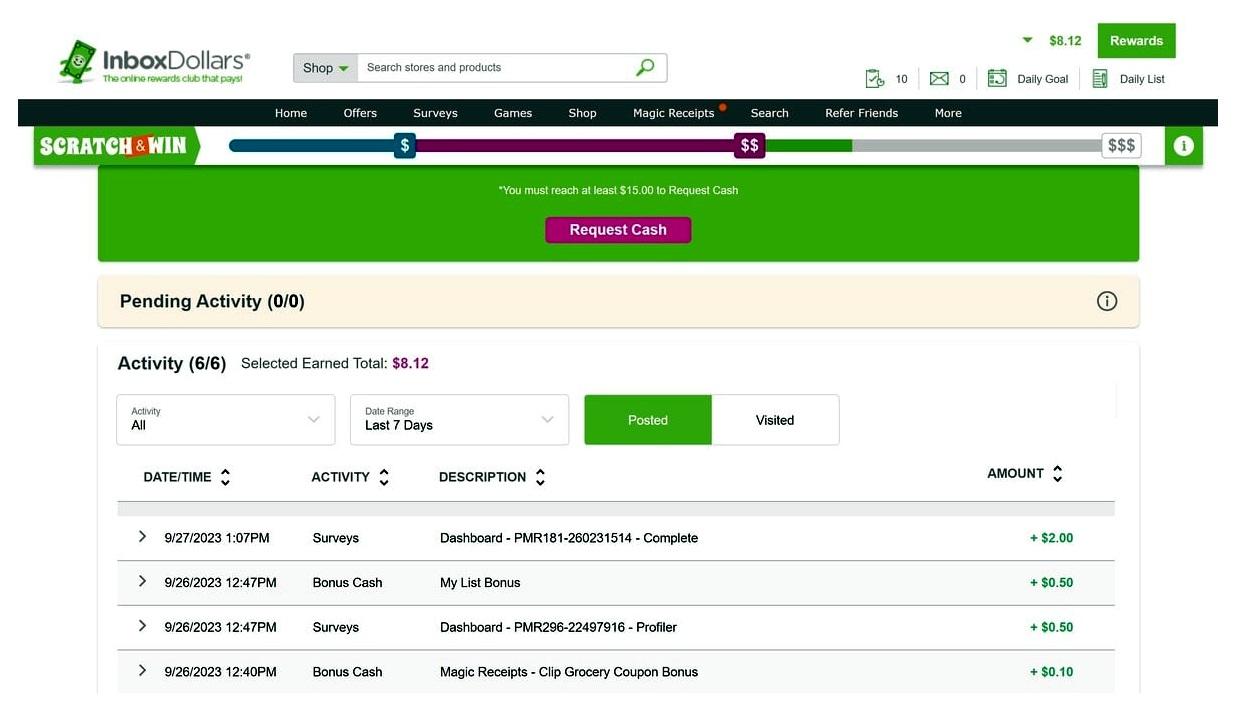
One thing I paid attention to was the activity history. It makes the site feel more transparent because I can see exact entries like survey credits, bonus cash, Magic Receipts bonuses, and list bonuses. That said, I would still screenshot bigger offers before starting them, especially game offers or anything that takes several days.
Best Ways To Earn On InboxDollars
1. Surveys
Surveys were the most practical part of the site for me. They usually showed a clear payout and estimated time, which made it easy to decide what was worth trying. The problem is disqualification. You can answer a few screening questions and still get kicked out, sometimes after spending enough time to be annoyed.
When a survey works, the pay can be decent for a rewards site. I saw survey payouts commonly around $0.50 to $5, with occasional higher ones. My best example was the $2 survey in about 13 minutes. I would start with surveys first, but I would avoid spending too long chasing low-paying ones.
2. Offers
The offer wall is where the bigger numbers show up. Some offers pay a few cents, while others show $10, $25, $50, or even more. The catch is that higher-paying offers often require more effort, a purchase, a trial, a game milestone, or a new account signup. I would not jump into every big offer just because the payout looks good.
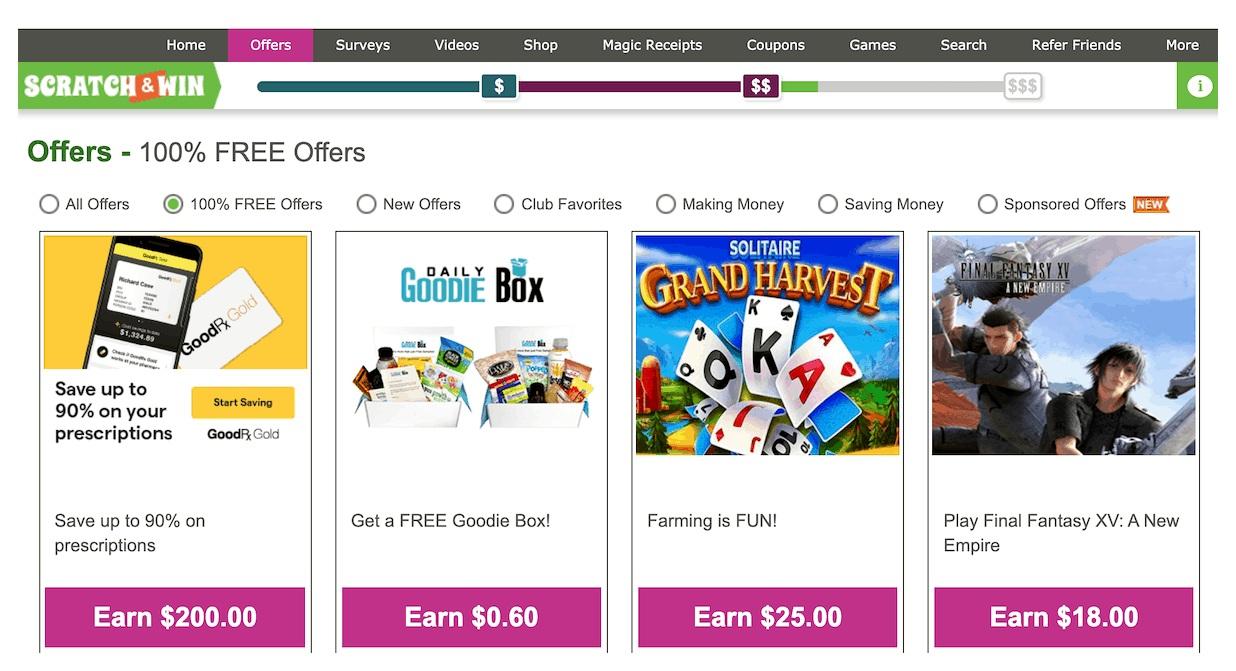
My rule here is simple: I only like offers when the requirements are clear, the time frame is realistic, and I am comfortable with the advertiser. If a free trial is involved, I set a reminder immediately. If an offer requires a purchase, I only count it as useful if I already wanted that product or service.
3. Magic Receipts And Cashback
Magic Receipts are one of the better features because they can fit into shopping you are already doing. You activate a deal, buy the qualifying item, upload the receipt, and wait for it to credit. It is not always instant, but it feels more practical than clicking tiny paid tasks.
Cashback shopping is similar. I would use it only when I already planned to buy something. Buying extra items just to get cashback defeats the whole point.
4. Daily List And Bonuses
The Daily List is useful because it gives you a simple structure. It pushes you to answer a poll, check receipts, attempt a survey, complete an offer, or hit a small daily goal. The bonuses are small, usually cents rather than dollars, but they help keep the routine organized.
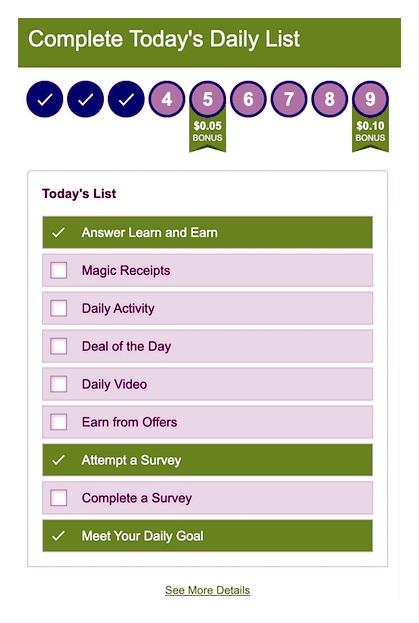
I would not use the Daily List as the main reason to log in, but it is a good way to avoid wandering around the site aimlessly.
5. Games, Scratch & Win, Search, And Videos
Games and Scratch & Win are more fun than profitable. My own example was rough: 30 minutes of game time led to a $0.02 reward. That does not mean every game offer is bad, but it does mean I would read the milestones carefully before putting serious time into one.
Videos and search-style earning features are not something I would rely on. Some older dashboard screenshots still show video tabs, and some users may see limited ad or video-style tasks, but they are inconsistent enough that I would treat them as bonus cents only.
Minimum Withdrawal And Payout Options
This is the part I would check before spending much time on the site. The current payout setup is much better than the older $30 number people still mention in older reviews.
| Cashout detail | What I found |
|---|---|
| Minimum first withdrawal | $15 |
| Minimum later withdrawals | $10 or higher increments |
| Payout options | PayPal, virtual gift cards, and prepaid Visa when available |
| Gift cards | Virtual delivery only |
| PayPal requirement | Your InboxDollars name and email need to match PayPal, and PayPal needs to be verified |
| Processing time | Often a few business days, but some payments can take up to 10 business days or longer if reviewed |
For me, the first cashout threshold is the main mental hurdle. The $5 signup bonus helps because it gets you part of the way there, but you still need to earn the rest through surveys, offers, receipts, or cashback. After the first cashout, the $10 threshold feels more manageable.
What I Liked
- The balance is shown in real dollars, not points.
- The dashboard makes rewards, activity, and daily goals easy to find.
- Surveys can pay fairly well when you qualify.
- Magic Receipts and cashback can stack with normal shopping.
- The $5 signup bonus helps with the first withdrawal goal.
What I Did Not Like
- Survey disqualifications can waste time.
- Games and Scratch & Win are usually weak for earnings.
- Some high-paying offers have strict requirements or take time to credit.
- Payments can be delayed if your account details need review.
- Older information online still mentions $30 cashout, which makes the payout rules confusing.
My Best Strategy
If I were using InboxDollars daily, I would spend the first few minutes checking the Daily List, then go straight to surveys and Magic Receipts. After that, I would look at free offers with clear terms. I would skip anything that requires too much time for a tiny payout.
A simple routine would be: check Daily List, attempt the best surveys first, upload any eligible receipts, scan the free offer wall, and cash out as soon as I qualify. I would also keep screenshots of larger offers and confirmation emails until the credit posts.
User Reviews | InboxDollars
Current average review
Based on 2 user reviews

Emily Dubois
I’ve used this service long enough to see how inconsistent it is. At first, I put in a lot of work, but they refused to credit my account even though I reached the required level in a game. When I tried contacting customer service, my requests were automatically denied, and any replies I sent were ignored. Other people seem to have had mixed experiences. Some said they were able to cash out over $200 without trouble, and a few mentioned that support responded quickly once they provided proof. But many, like me, reported missing credits, denied tickets, or having to fight for weeks just to get what was owed. A lot of users agreed that smaller payouts usually go through, but bigger rewards often turn into a hassle. Overall, I feel it’s unreliable. The constant denials, lack of real support, and missing payments make it more frustrating than it’s worth.
Oscar Romano
I tried InboxDollars, a platform where you can earn money by completing tasks like surveys, watching videos, and playing games. I was able to cash out successfully through PayPal, which worked smoothly. Compared to Swagbucks and Survey Junkie, it has some unique features but isn’t necessarily better overall. In terms of earnings, it’s fair but limited. I made a little over $20 in about a month, so it’s fine for extra cash or gift cards but nothing more. Task availability depends on your location and demographic, though I usually found enough offers to reach my goals. The payout threshold is $15, down from $30, and while slightly higher than some platforms, the payments are reliable. The site is easy to use and straightforward, though not very modern in design. They also give a $5 signup bonus after confirming your email, which covers about a third of the payout requirement. Overall, InboxDollars is legitimate, but I wouldn’t recommend it as the best option if you just want casual, quick ways to earn from your phone.